
BTEC AAQ IT Unit 3: Website Development Coursework Resources

Welcome to the complete guide for BTEC AAQ Information Technology Unit 3: Website Development.
This guide supports students aged 16–21 studying BTEC Level 3 Information Technology as well as teachers delivering the qualification. Unit 3 is an internally assessed, coursework-only unit (60 GLH) completed through a 15-hour Pearson-Set Assignment Brief (PSAB).
What is BTEC AAQ IT Unit 3?
Unit 3 focuses on planning, designing, and building a modern website to meet an authentic client brief.
In this unit, you will learn how to:
- Research how real-world websites meet user needs and client goals.
- Plan site structures, user flows, and site maps.
- Create wireframes and visual design mockups.
- Produce and manage digital assets such as vector graphics, copy, and compressed media.
- Develop web pages using clean HTML, modern CSS, and interactive JavaScript.
- Conduct functionality testing, usability audits, and self-reviews.
How is Unit 3 Assessed?
Unlike examined units, Unit 3 has no written exam paper. It is completed via a single 15-hour practical assignment broken into three structured tasks:
- Task 1 (Learning Aim A): Web principles research, competitor analysis, and site mapping.
- Task 2 (Learning Aim B): Wireframing, visual styling, and asset preparation.
- Task 3 (Learning Aim C): Website development, testing, and self-review.
Topics Covered in Unit 3
1. Website Purpose & Layout Principles
Understanding how visitors browse and interact with online content:
- Common Purposes: eCommerce, portfolios, information hubs, and entertainment.
- Reading Patterns: F-shaped pattern for heavy text and Z-shaped pattern for visual landing pages.
- Navigation Structures: Sticky headers, vertical sidebars, and mobile hamburger menus.
- Visual Hierarchy: Using scale, spacing, and contrast to guide user attention.
2. Accessibility & Legal Constraints
Building ethical and inclusive digital experiences:
- Accessibility Standards: WCAG and W3C guidelines, screen reader text, and keyboard navigation.
- Legal Frameworks: UK GDPR compliance, data privacy, and digital copyright laws.
- Cross-Device Compatibility: Responsive design across mobile, tablet, and desktop screens.
3. Design & Asset Management
Preparing professional components before writing code:
- Wireframing: Lo-fi paper sketches and hi-fi UI wireframes with proper alignment.
- Visual Style: Harmonious colour palettes, typography, and clear brand identity.
- Asset Optimization: Cropping, vector drafting, and compressing media to ensure fast loading speeds.
4. Front-End Development
Bringing the client’s concept to life using core web technologies:
- HTML: Semantic structure, tables, media embeds, and input forms.
- CSS: Flexbox/grid layouts, box models, styling, and media queries for responsiveness.
- JavaScript: Dynamic functionality such as image sliders, modal dialogs, and navigation toggles.
5. Testing & Self-Review
Verifying quality and fitness for purpose:
- Functionality Testing: Testing hyperlinks, forms, media players, and script errors.
- Usability Audits: Gathering user feedback to evaluate layout clarity and navigation ease.
- Refinement: Reviewing the final product against client requirements and making adjustments.
Step-by-Step Assignment Strategy
Task 1: Research & Site Planning
Analyse two real-world websites in the same sector as your scenario. Discuss their layout patterns, accessibility features, and brand tone. Follow this with an annotated site map establishing your page hierarchy and navigation flow.
Task 2: Wireframing & Asset Management
Create clean wireframes for every planned page showing grid alignment and element spacing. Keep your project assets organized in a dedicated directory with consistent, logical file naming conventions.
Task 3: Production, Testing & Review
Build your layout with semantic HTML and external CSS stylesheets. Document any AI code assistance or development tools used, complete an iterative test plan, and write a focused self-review evaluating your final site against the client brief.
Revision Resources
Writing Frame
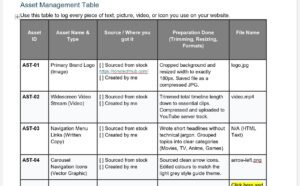
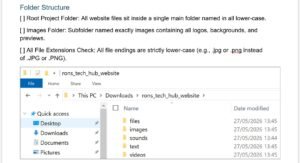
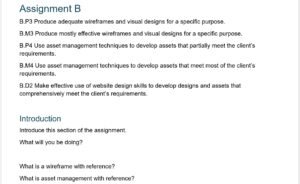
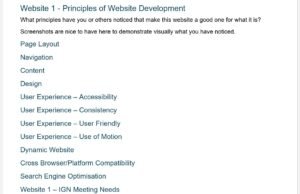
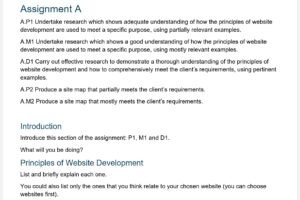
Example layout/outline for the report to be submitted.
Example Assignment Briefs

Perfect for learning key definitions such as:
- Malware types
- Security tools
- Legal terms
- Cyber attack methods
Cheat Sheet (HTML, CSS, JS)

Test your knowledge and identify weak areas before exams.
Video Lessons

Visual explanations that make complex cyber security topics easier to understand.